.png)
Preloading and pitfalls
-
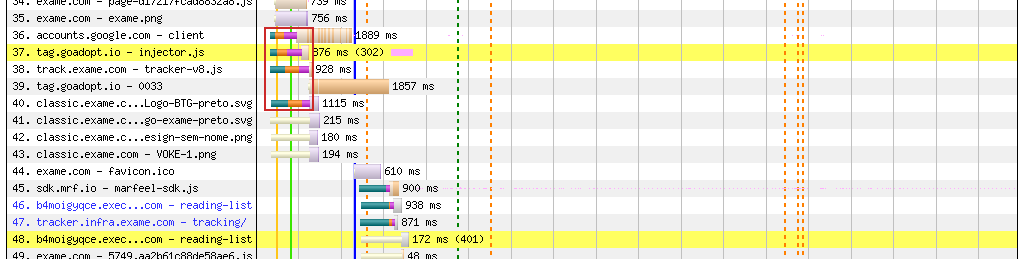
(Waterfall graph of a website using preload for a few scripts and a logo. The DNS-TCP-TLS connections in the red rectangle are preloaded and happen early, while the ones near the bottom aren't preloaded and only happen after the document is complete)
Preloading is certainly one of the most common techniques being used to optimize page speeds. Chrome Usage Metrics show that in 2025 almost 50% of websites use preloading in some shape or form, up from 31% back in 2021, when it became baseline. That puts it well into "common sense" territory, which is good, but it also means some developers might use it without fully understanding how it works under the hood. This article will give a brief overview on the feature, how to use it, how it works in the browser, and some common pitfalls.
With preloading, the name gives the game away: it does what it says, it loads something before something else. But if every resource used in a page must be loaded sooner or later, and they are loaded when the respective HTML element is parsed, then how can some resources "skip the line" and be pre-loaded? Let's see what the MDN docs have to say:
The
preloadvalue of the<link>element'srelattribute lets you declare fetch requests in the HTML's<head>, specifying resources that your page will need very soon, which you want to start loading early in the page lifecycle, before browsers' main rendering machinery kicks in. This ensures they are available earlier and are less likely to block the page's render, improving performance. Even though the name contains the term load, it doesn't load and execute the script but only schedules it to be downloaded and cached with a higher priority.(Emphasis ours)
The two takeaways here are that preloaded resources are somehow loaded even before the page starts rendering, and that the line being skipped is not the parsing, but the download. This makes a lot of sense, considering it's a feature of
<link>elements, which are used for external resources.web.dev gives us some practical advice:
preloaddirectives should be limited to late-discovered critical resources. The most common use cases are font files, CSS files fetched through@importdeclarations, or CSSbackground-imageresources that are likely to be Largest Contentful Paint (LCP) candidates. In such cases, these files wouldn't be discovered by the preload scanner as the resource is referenced in external resources.Sounds like we do want to preload impactful resources: fonts and CSS might affect the look of the whole page, and the LCP is often a page's greeting card. But what's that about "late-discovered resources" and "preload scanner"? Let's take a closer look into how internet browsers work.
What is the preload scanner?
The process of turning markup, style sheets, and scripts into an interactive web page is complicated. The browser has to, somehow, interpret lists of elements and visual descriptions into a layout with text and images positioned correctly, which means figuring their dimensions, moving things around, animating, keeping track of references, and even running code. It's a lot.
That begins, of course, with the HTML itself being parsed. The browser slowly builds the Document Object Model (DOM) out of each listed element, and sometimes those are lengthy steps which may run into a resource that is not in the page itself. It has to fetch those resources - like someone following a recipe and finding they are missing an ingredient and must go to the grocery store - and that delays the rest of the process. Luckily, this chef already has someone to the grocery run: the preload scanner. The moment the HTML arrives and starts being parsed, the preload scanner will just read ahead to find what else will be needed later, like an assistant checking what ingredients are missing and fetching them while the chef is busy with a different step of the recipe.
Notice that the preload scanner always acts. It isn't waiting for instructions, and we haven't talked about
<link>elements withrel="preload". That's because the preload directive is less like an instruction and more like a hint. If the scanner finds and loads some CSS before the parser reaches it, then that's good, but if the style sheet also depends on external images we will sooner or later reach that point where the parser is waiting on something to arrive before it can continue its work. By adding a preload link to that image in the document head, we can let the preload scanner know that we'll need it eventually even if there's no mention of it in the HTML.(We suggest the article Don't fight the browser preload scanner by web.dev for a deeper dive)
What are some common pitfalls?
As with everything that can be done, it can be done wrong. We've outlined some common ways developers worsen their websites' performance by misusing or misunderstanding how preloading works. The two biggest sins are:
Preloading too much
This one is almost tautological. It's easy to imagine that if everything is preloaded, nothing is. In practice, this looks like all external resources being referenced and preloaded in the document head like a huge grocery list occupying the metaphorical assistant, who could be helping the chef peel and chop the ingredients. It will eat up data and processing to load now things that could safely be loaded later (like images on the bottom of the page), while also delaying the loading of resources that are needed soon. Avoid preloading heavier files, like large images and videos, to not delay all the rest.
Preloading assets but not using them
This might sound surprising, but it's so common Chrome and Firefox have specific warnings for those cases. If you have ever inspected a website and seen the following message in the console, you might have been a victim of spurious preloading:
The resource <URL> was preloaded using link preload but not used within a few seconds from the window's load event.In his 2024 performance.now() talk, Paul Calvano claims nearly half the websites logged by the HTTP Archive that preload data are not actually using all the preloaded assets. We theorize this is downstream from the previous issue: a website that features a carousel and preloads all its images will never actually display all images if the user never interacts with it. If there's an icon in the page footer, but most users never scroll all the way down, it will never be shown. Basically every browser used today supports WOFF2, but if a zealous developer opts to provide their fonts in a second format as a fallback, and they preload this alternative, it will almost always end up as a preloaded-but-unused asset (and when it's used, the original format will be loaded-but-unused instead).
In conclusion
Be mindful. Preloading is an automatic browser process that will, occasionally, need just a little help from the developer, and there's no such thing as a magical keyword that makes things load faster. This kitchen assistant can be much more than just an errand boy, but only if you let them spend some time in the kitchen.
Further reading
If you'd like to dive deeper, here are some recommendations: